

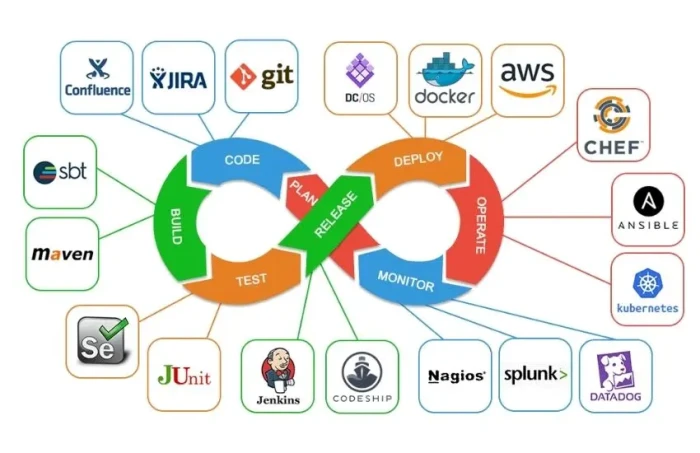
A visual comparison tool catches the UI defects that functional tests miss: a shifted button, a broken grid, a font that renders differently after a dependency bump. Functional assertions confirm that a feature works. They say nothing about whether it looks right.
In a modern CI/CD pipeline, that gap matters. Teams ship multiple times a day, and a single CSS change can break layouts across unrelated pages. The only practical way to catch these regressions early is to run visual checks automatically on every build.
So the real question is not which visual comparison tool has the nicest dashboard. It is which one folds into your pipeline cleanly, runs without constant babysitting, and gives reviewers a fast, clear decision on each change. This guide breaks down the capabilities that decide that, how to wire visual testing into CI/CD, and how to keep it fast as your suite grows.
What Seamless CI/CD Integration Means for a Visual Comparison Tool
Every visual comparison tool runs the same core loop: capture a screenshot, compare it against an approved baseline, and report what changed. Integration is about how cleanly that loop fits into your pipeline.
A tool integrates seamlessly when it triggers on the events you already use (commits, pull requests, scheduled runs), runs inside your existing test frameworks, and reports results back to the same place your team reviews code. If engineers have to leave the pull request to find out what changed, the workflow breaks down, and visual testing gets skipped.
Seamlessness also means low noise. A tool that flags every anti-aliasing difference as a failure trains your team to ignore it. The goal is a visual testing tool that surfaces real regressions and stays quiet about rendering artifacts.
Core Capabilities That Determine CI/CD Fit
These capabilities separate a visual comparison tool that disappears into your pipeline from one that fights it.
- Native Connectors for Your CI/CD Platform: The tool should plug directly into Jenkins, GitHub Actions, GitLab CI, CircleCI, Azure DevOps, or whatever runs your builds. Native connectors mean no brittle custom scripting to trigger runs or publish results.
- SDK and CLI Support for Existing Frameworks: Visual checks should run inside the frameworks you already use, such as Selenium, Playwright, Cypress, Puppeteer, or WebdriverIO. A command-line interface matters too, since pipelines invoke tests through scripts, not dashboards.
- Git-Based Baseline Management: Baselines are reference images, and they deserve the same version-control discipline as code. The tool should support per-branch baselines so parallel feature work does not collide, and it should never update a baseline on merge without review.
- Pull Request Gates and Inline Diffs: The strongest signal of good integration is a status check on the pull request itself, with before, after, and diff images visible where reviewers already work. Merge protection that blocks a PR until visual changes are approved keeps regressions out of the main branch.
- Parallel Execution at Scale: Screenshot capture and comparison across browsers and viewports is slow. A tool that distributes runs in parallel keeps visual testing from becoming the bottleneck as your snapshot count grows from dozens to thousands.
- Intelligent Noise Reduction: Dynamic content such as ads, timestamps, and animations, along with sub-pixel rendering differences, generates false positives. A capable tool filters this noise, ideally with AI-assisted comparison, so reviewers spend their time on real bugs.
- Clear Reporting and Root Cause Context: Showing what changed is table stakes. The best tools also indicate where and why, with DOM-level or layout insight that helps a reviewer make the approve-or-reject call in seconds.
How to Evaluate a Visual Testing Tool for Your Pipeline
Before committing to a visual testing tool, run it against a short, practical checklist:
- Does it trigger pull requests, not just nightly runs?
- Can it run as a separate, parallel CI job so it never blocks functional feedback?
- Does it store diffs as artifacts that reviewers can open directly in the PR?
- Does it require explicit approval before a baseline update?
- Does it produce consistent screenshots across environments, or will Linux-versus-macOS font rendering create phantom failures?
- Does noise filtering cut false positives without hiding real regressions?
A tool that passes all six will fit almost any pipeline. One that fails several will cost you more in maintenance than it saves in caught bugs.
Integrating Visual Comparison Into Your CI/CD Workflow
Wiring visual checks into CI/CD follows a repeatable sequence.
- Define the scope. Start with high-impact, stable pages such as login, checkout, and dashboards. Expand coverage once the workflow is proven.
- Capture clean baselines. Generate reference screenshots in a fixed environment with pinned browser, OS, and font versions to avoid environment-driven noise.
- Run on every pull request. Trigger the visual suite on each PR so regressions surface before merge, not after release.
- Separate the visual job. Run visual tests in their own parallel CI job, so their slower runtime does not delay functional test feedback.
- Publish diffs to the PR. Store before, after, and diff images as artifacts and surface them as a status check that reviewers can act on.
- Gate the merge. Block the pull request until a reviewer approves or rejects flagged changes, and never auto-approve baseline updates.
The friction in this sequence usually shows up in two places: framework compatibility and false-positive noise. Pixel-based diffs flag anti-aliasing and dynamic content as failures, which bury real regressions and stalls merges while engineers triage noise.
Platforms like TestMu AI (formerly LambdaTest) provide SmartUI, an AI-native visual regression testing platform that plugs into existing frameworks and filters rendering noise so visual checks run cleanly on every build. Key capabilities include:
- SmartUI SDK Integration: Universal framework support for Selenium, Playwright, Puppeteer, Cypress, WebdriverIO, and TestCafe across all major languages, with minimal code changes.
- SmartUI CLI: Command-line interface with Git-based execution, CI/CD integration, and automated baseline management.
- GitHub Integration: Automatic PR visual testing with regression status, side-by-side comparisons in PR comments, and merge protection gates.
Scaling Visual Tests Without Slowing Your Pipeline
Visual tests are heavier than functional tests. They capture screenshots, upload them, and run comparisons across browser and viewport combinations. Running them serially on every pull request stretches pipeline times and delays feedback, which is exactly when teams start disabling the checks they need.
To solve this, TestMu AI’s HyperExecute provides AI-native test orchestration that runs suites in parallel and matches local execution speeds. Key capabilities include:
- Smart Test Distribution: Matrix and Auto-Split strategies distribute tests across available resources for maximum parallelization.
- 70% Faster Execution: Tests run in isolated, unified environments that eliminate network latency, reducing execution time by up to 70% compared to traditional grids.
- Advanced CI/CD Integration: Native integrations with Jenkins, GitHub Actions, GitLab CI, CircleCI, and Azure DevOps, with PR-based testing and real-time status reporting.
Common Pitfalls to Avoid
Even a well-chosen visual comparison tool can fail in practice. Watch for these mistakes:
- Auto-updating baselines on merge. If no one reviews the change, the baseline drifts, and the tool starts validating against a broken reference.
- Setting a zero-tolerance threshold. An exact pixel match drowns reviewers in noise from rendering artifacts. Start with a small tolerance and tune it from there.
- Capturing in inconsistent environments. Screenshots taken on macOS locally and Linux in CI will differ in font rendering alone. Pin the environment with containers.
- Blocking functional feedback. Keep visual tests in a separate job so their runtime never gates the rest of the pipeline.
- Testing dynamic regions without masking. Mask or ignore ads, timestamps, and animations before they generate endless false positives.
Final Thoughts
The visual comparison tool that integrates most seamlessly into a modern CI/CD pipeline is the one that triggers on your existing events, runs inside your existing frameworks, reports into your existing review workflow, and stays quiet about noise. Fit matters more than brand.
Evaluate candidates against the capabilities above, wire them in on every pull request, and keep the visual job parallel and fast. Done well, visual testing becomes an invisible safety net that catches UI regressions before users ever see them.
Frequently Asked Questions
What is a visual comparison tool?
A visual comparison tool captures screenshots of your UI and compares them against approved baseline images to detect unintended changes such as layout shifts, styling errors, and rendering differences. It catches visual defects that functional tests do not check for.
How does a visual testing tool fit into a CI/CD pipeline?
It runs as an automated step, usually on every pull request. The tool captures fresh screenshots, compares them to baselines, and reports differences as a status check so reviewers can approve or reject changes before merging.
Why do visual tests produce false positives?
False positives come from anti-aliasing, dynamic content, animations, and environment differences such as font rendering. Tuning comparison thresholds, masking dynamic regions, and using AI-assisted noise reduction all help cut them down.
Should baselines be updated automatically?
No. Baseline updates should require explicit review and approval. Auto-updating on merge lets the reference drift and can hide real regressions for a long time.
How do I keep visual tests from slowing my pipeline?
Run them in a separate, parallel CI job, distribute runs across browsers and viewports, and limit scope to high-impact screens. Orchestration platforms that parallelize execution keep runtimes low even as the suite grows.